Why prompts beat apps
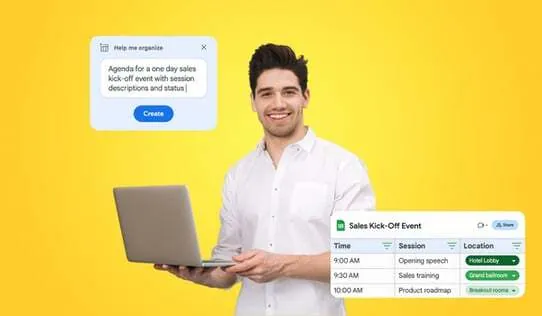
In 2026 the fastest productivity upgrade is not yet another app. It is a library of sharp prompts that you actually reuse. Most people add an AI subscription and keep doing the same work in the same tool — the new chat window just becomes one more tab. A good prompt is closer to a written workflow: it tells the assistant exactly what to produce, for whom, in what tone, and with which constraints. The result is a first draft that is closer to final, and that is where the time is saved.
None of this is magic. A prompt does not make a model more correct; it makes the output more useful and the back-and-forth shorter. You still verify facts, dates and prices before anything goes to a client or team. What you stop doing is staring at a blank reply box and rewriting the same email three times.
Two rules before the list. First, paste real context every time — the assistant only knows what you give it, so a two-line brief beats a perfect fictional prompt. Second, treat the first result as draft zero. If it is off, say so and ask for a tighter version; one short follow-up is faster than restarting from scratch. Want a ready-made start? The free Remote Work Revenue Starter Kit ships five day-planning prompts you can use today.
The 10 prompts
1. Daily planning
Paste your open tasks and notes, then: "Sort these into three groups — must do today, can wait until tomorrow, delete or delegate. Put the single most important task first." The value is not the sorting itself; it is that you start the day with one ordered list instead of ten half-remembered to-do apps. A mini-example: one freelancer ran this every morning for a week and it cut their 20-item brain dump down to a 5-item list that actually matched the calendar. Pair it with protected calendar blocks — the Deep Work Days system builds those for you.
2. Email replies
"Rewrite this draft in a warmer, more direct tone. Keep the main point in the first sentence. Under four sentences." This works best on drafts that already exist — the reply you wrote before lunch and know is rambling. It is much weaker when you ask for an email from nothing, because it has none of your context. Give it your version first. For the full email drafting workflow, see How to Use ChatGPT Prompts for Work.
3. Meeting recap
"Here is the transcript. Give me three sections only: decisions made, action items with owners, and open questions. Do not add anything that is not in the text." The last sentence is the honest one. Meeting notes are done for by the noise — recaps die when the model hallucinates a decision nobody made. If the output invents a task, tell it to stick to the transcript and rerun.
4. Long document digest
"Summarize this document in ten numbered lines, one or two sentences each. Flag anything that looks like a risk, a deadline or a price." Great for contracts, onboarding guides and pricing pages your client sent over. Keep the flag instruction in there — the summary is only useful if it surfaces the numbers you would have skimmed past.
5. Announcement writer
"Turn these bullet points into a short team announcement: a subject line, then three short paragraphs. No emoji and no hype." Internal announcements get a lift from a structure you would not bother to build yourself. The "no hype" clause matters; without it you get launch-style language for a minor policy update.
6. Meeting notes to tasks
"Extract every action item from these notes. Return them as task, owner, rough date. Skip anything with no action." Unstructured meetings produce notes people never reopen. This turns them into a list you can drop into any task manager. If the notes have no names, the output cannot invent owners — so slot them in yourself. If you run projects in Notion, this project-management template gives the extracted tasks a home.
7. Tricky message
"Draft a message to a client about this situation: [one-line reality]. The tone should be calm, take ownership, and offer a concrete next step. Give me a two-sentence version and a six-sentence version." The two lengths matter. The short one handles the urgent reply; the long one handles the relationship. Replace the bracket with the real situation, not a sanitized version.
8. Decision options
"I have to choose between A and B. Give me three criteria to judge them by, score both out of five on each, and make a recommendation with reasons. If the evidence does not justify a winner, say so." The final clause is the anti-sycophancy guard. A good output here is a thinking scaffold, not a verdict — you still own the call.
9. Weekly review
"Here is my task log for the week. Group everything into finished, in progress, and stuck. For each stuck item, suggest one concrete unblocking action. Keep the whole output under 150 words. Pair the review with a weekly planning ritual — more ideas in Remote Work Productivity Tips." The 150-word limit forces it to prioritize instead of narrating your week back to you.
10. Standup update
"Turn my raw notes into a six-bullet standup: yesterday, today, blockers, asks. No padding, no 'making good progress'." Filler words survive in AI output the same way they survive in human output. Naming the ban is what kills them.
How to get more from these prompts
- Save the five you actually use as snippets — in Raycast, Alfred, or a Notion page. Reuse is the whole point; a prompt you rebuild from memory is not a system.
- Add constraints. Word count, format and audience are the difference between a generic paragraph and something you can paste into the actual email.
- Feed real data every time. The 60 seconds spent pasting your draft or your task log is where the time saving happens.
- Double-check numbers. AI will confidently repeat a wrong figure it copied from your own paste. Prices, dates and deadlines get a human review.
- Keep private context private. If a prompt contains client names or contract figures, keep it out of shared drives and off auto-save tools.
- Shrink, don't grow, the list. A vault you can use blind beats a vault you have to read to use.
A short note, honestly: none of these prompts writes the work for you. They remove the blank page and the clutter — the two places where procrastination actually lives. That is the whole win.
This list is the top of a bigger library. The The Prompt Engineering Playbook packs 300+ prompts organized by role, so you can pull the right one and adapt it in seconds instead of building every prompt from scratch.